UX case study

Increasing adoption of a unique feature

Project: AllPeeP

Role: UX designer

Timeline: 2 weeks

The problem

AllPeeP features a unique component called a "Jam" a branded live meeting or event that differentiates us from conventional platforms like Google Meet or Zoom. However, the term "Jam" is not immediately self-explanatory to community members, particularly on mobile. During customer interactions, feedback emerged that users need clear, in-app guidance explaining what a Jam is and how to use it.

The need

  • Clarity and Education:

    Users must quickly understand the purpose and functionality of a Jam.
  • Seamless Experience:

    The solution should deliver this information without forcing users to leave the current screen or disrupting their workflow.
  • Minimal Engineering & Cost Impact:

    The solution must be lightweight, easy to implement, and internationalization-friendly.

Why

The challenge exists because the term "Jam" is not immediately self-explanatory to community members, particularly on mobile. During customer interactions, feedback emerged that users need clear, in-app guidance explaining what a Jam is and how to use it.

  • Brand Differentiation:

    “Jam” is a distinctive term coined by AllPeeP, yet its meaning might not be obvious to users familiar with standard terminology in other platforms.
  • User Onboarding:

    Proper, in-context education is essential to ensure users can engage with and derive value from this unique feature.
  • Contextual Assistance:

    Providing relevant, just-in-time information improves the overall user experience, reducing friction and confusion.

Exploring Possible Solutions

A. In-App Tooltip with “Learn More” Link

How It Works:

An info icon is placed next to the Jam label. When tapped, a brief tooltip appears with a concise explanation and a “Learn More” link that navigates users to a dedicated help page.

Pros:
  • Minimal development effort using existing UI components.
  • Easily localized via resource files.
  • Non-intrusive and lightweight.
Cons:
  • Limited space for comprehensive details.
  • Requires navigation away from the current page, which can disrupt the user flow.
  • On mobile, the small screen and absence of hover interactions make tooltips less effective.

B. Interactive Onboarding Slide

How It Works:

Integrate a series of onboarding slides that introduce and explain the Jam feature when users first access it.

Pros:
  • Provides a comprehensive and engaging introduction.
  • Can include visuals and step-by-step instructions.
Cons:
  • Higher development overhead and potential to overwhelm users.
  • More content to maintain and localize.

C. Modal Pop-Up on First Use

How It Works:

A modal window appears on the first use of the Jam feature, delivering detailed information and visuals.

Pros:
  • High visibility ensuring that users receive the explanation.
  • Ample space for detailed descriptions.
Cons:
  • Can interrupt the user experience if not timed properly.
  • Requires tracking of first-use events, increasing engineering effort.
  • More complex localization due to extensive content.

D. Drawer with Info Icon Trigger (Recommended Approach)

How It Works:

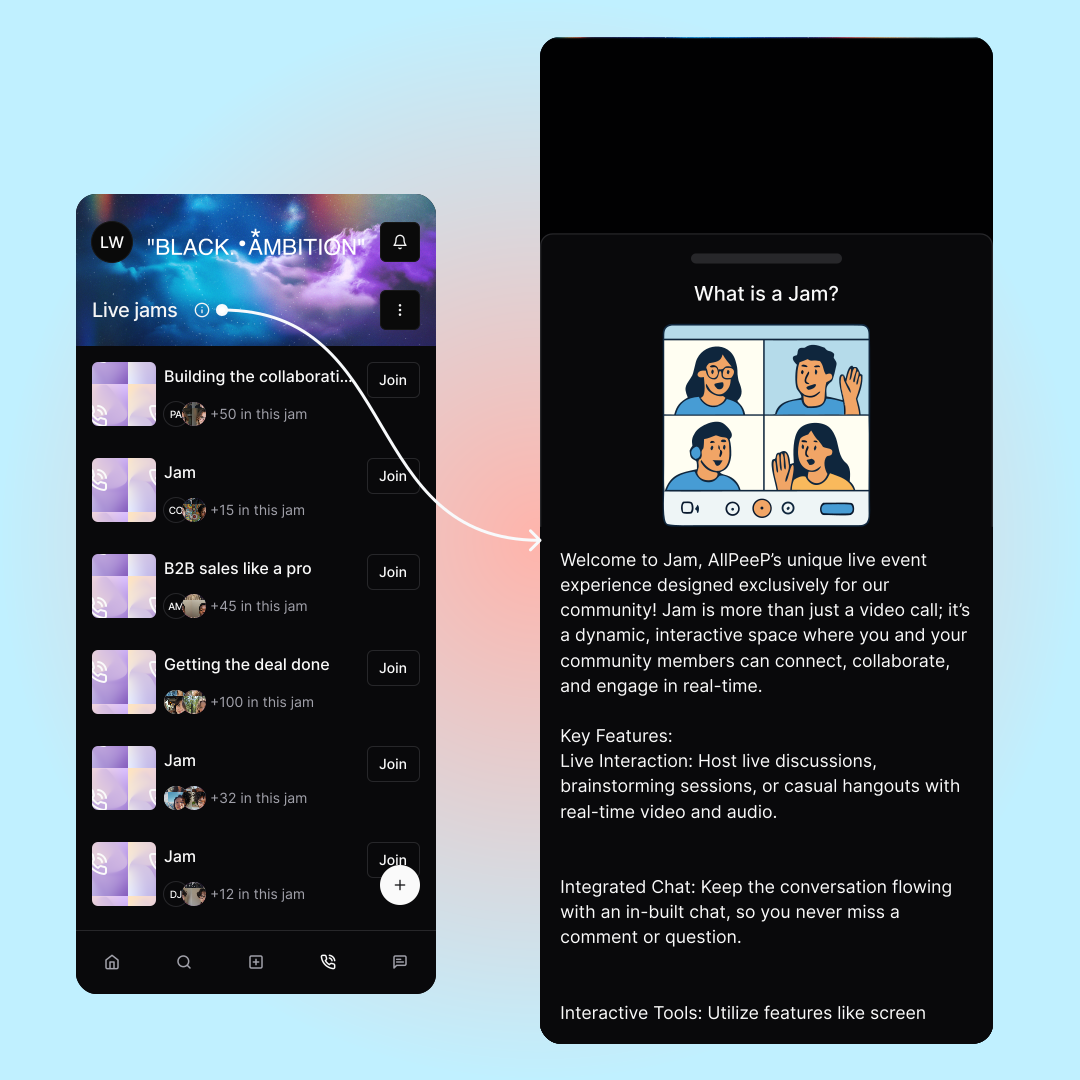
An info icon is placed next to the Jam label. Tapping this icon triggers a bottom drawer that slides in from the bottom, presenting detailed information about what a Jam is, usage instructions, visuals, and interactive elements, all without navigating away from the current screen.

Pros:
  • Rich, Contextual Information: Delivers a detailed explanation without forcing a page change.
  • Seamless User Experience: Keeps users in the current context, reducing cognitive disruption.
  • Flexible and Scalable: Supports multiple content types (text, images, animations) and is adaptable to design needs.
  • Efficient Implementation: Can leverage pre-built UI components available in mobile frameworks; client-side flags (e.g., local storage) can control first-use display without extensive backend changes.
  • Internationalization-Friendly: All content is managed in localized resource files, ensuring ease of translation and maintenance.
Cons:
  • Screen Real Estate Considerations: The design must ensure that the drawer does not overcrowd the screen, especially on smaller devices.
  • Potential for Disruption: Needs careful design to avoid interrupting the user's primary interactions.
  • Design Consistency: Must align with the existing UI design to provide a cohesive experience.

Solution design

Solution design

Measurable Impacts

Implementing the info-drawer solution can yield several measurable benefits:

  • Increased Feature Adoption:

    Metric:
    Track the percentage of users who engage with the Jam feature before and after the drawer implementation.
    Expected Impact:
    A clearer explanation will likely lead to higher usage rates of the Jam feature.
  • Improved Engagement:

    Metric:
    Measure dwell time on the drawer, scroll depth, and interactions with content (e.g., clicks on additional links).
    Expected Impact:
    Rich, in-context information should boost overall engagement with the feature.
  • Reduction in Support Queries:

    Metric:
    Monitor the volume of help desk tickets or inquiries related to understanding what a Jam is.
    Expected Impact:
    Clear, readily available information should decrease user confusion and reduce support requests.
  • Faster Time-to-First-Use:

    Metric:
    Track the average time from user registration to first interaction with the Jam feature.
    Expected Impact:
    In-context guidance will accelerate user onboarding and initial feature usage.

Conclusion

The design challenge of educating users about the unique "Jam" feature while maintaining a seamless, uncluttered mobile experience is critical for AllPeeP. The proposed solution, a drawer triggered by an info icon offers a detailed, context-rich explanation without disrupting user workflows. Measurable impacts include higher feature adoption, increased engagement, reduced support queries, and improved user satisfaction.

By implementing the info-drawer solution and tracking the outlined metrics, AllPeeP can ensure that its users fully understand and derive value from the Jam feature, ultimately driving a better user experience and long-term engagement.

Additional video

See more

Faster usability signals with AI personas

Shamp

Reducing procurement decision time

Sourcify

Want to work with me?

I'd love to hear from you!

Work with me
Design desk with planning sheets and color swatches
Elvis Preye Kerebi's Portfolio